Top Stories vs Most Recent
Ever notice that some of your Facebook friends never show up in your feed? That may mean they de-friended you, or Facebook may be blocking their feed. Facebook thinks it knows who your best friends are and as a result will attempt to deliver what they consider “Top Stories” to try to keep your news feed more manageable.
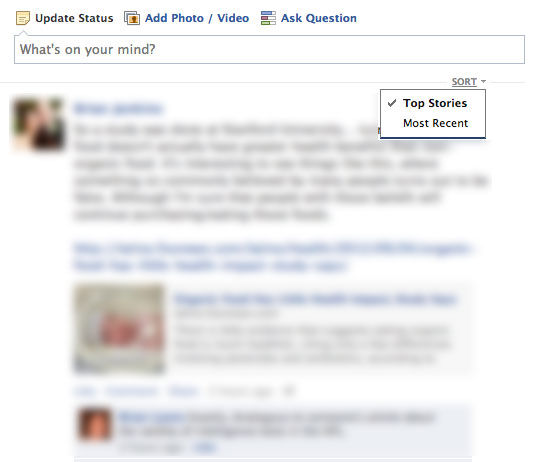
In order to see every post that all of your Facebook friends make you will want to switch your feed settings to “Most Recent”. You will have to do this every time you log in unfortunately. At the top of your news feed under your update status box you will see “SORT”, click this and choose “Most Recent”.
Hide Users, Games, Apps, etc Updates
Not everything your friends do on Facebook is enjoyable. We went over some big ones in Facebook Follies. Horoscopes and game invites are the ones that irritate me the most. To remove these obnoxious updates from your feed Facebook has hidden a lovely feature. In the upper right corner of your friends update is a hidden drop down arrow that will appear when you mouse over it. Clicking this button will give you some options.
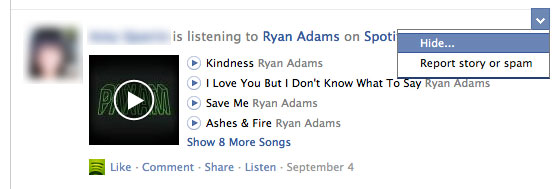
By clicking hide you will have some more options for choosing what it is you want to block. You can block your friend, limit how much you see of your friend, or just block the app updates they may be using.

@Mentions
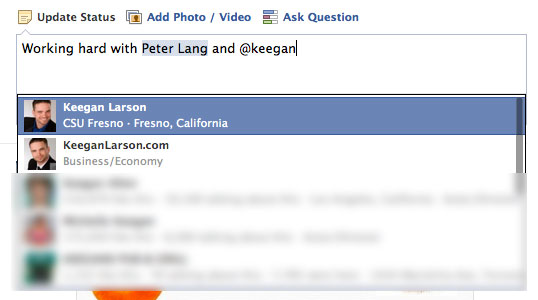
Are you creating a new text update and you want to “tag” your friends in it like you would an image? By using the @ or + symbol before your friends name Facebook will tag them in your post. This will also notify them that they have been mentioned in your post. Twitter anyone?
Some of you more avid Facebook users probably already knew about all of these tips, but I am amazed by how many people I meet who complain about all the annoying updates and were unaware that they could block these app updates.
Do you know of any other simple fixes for annoying Facebook features?